
Major Enhancements to IHM
With the HKC now in force (June 2025), shipowners face greater compliance pressure under EU SRR and IHM Part 1.
ShipServ simplifies compliance by combining AI detection, automated supplier workflows, and central dashboards for buyers, suppliers, and vessels — all in one platform.

Learn how d’Amico is leveraging IHM to simplify compliance and strengthen supplier management across its global fleet:

For Buyers
Enhanced IHM Reporting Dashboard
Expanded view with deeper supplier and vessel compliance data. It also leverages AI/data extraction to auto-populate key compliance fields directly from supplier MDs and SDoCs (e.g., MD/SDoC numbers, hazardous materials detected).
This provides greater transparency across fleets and operations, reduces manual data entry, accelerates reporting, and improves accuracy of compliance audits.

Vessel-Specific Dashboard Access
Each user’s dashboard, reports, and alerts are filtered to the specific vessels they own or are assigned to. This reduces noise and data exposure, enforces least-privilege access, and drives faster action by focusing each person on the vessels that matter to them—while preserving full oversight for authorised roles.

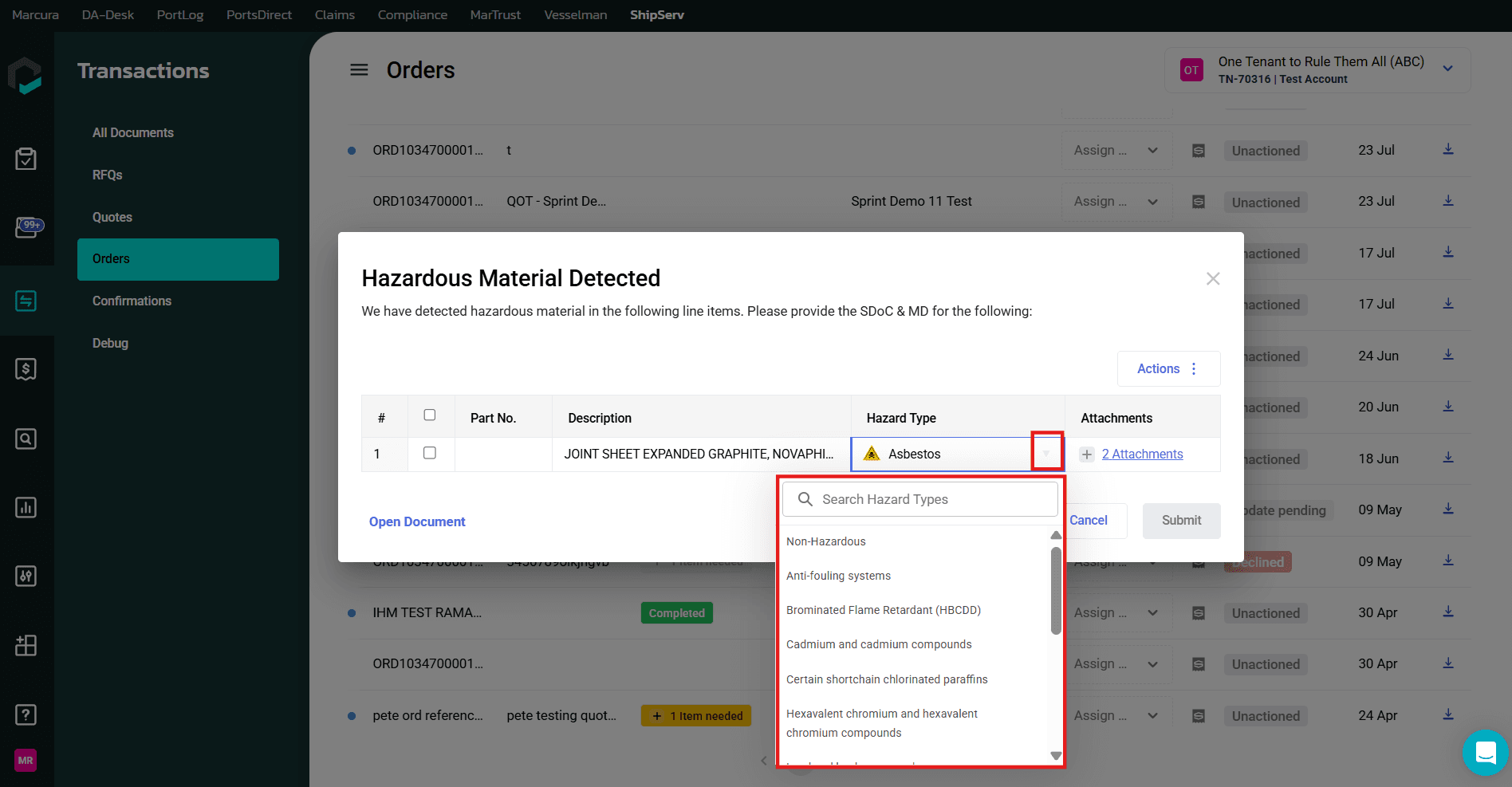
Revised Hazard Type Classification With Mandatory Justification
Both buyers and suppliers now work with an updated Hazard Type aligned directly with the Hazard/Materials Classification defined under IHM Part 1 Regulation. This improves accuracy of hazardous material identification, reduces false positives, and ensures reporting aligns with regulatory categories.
For both Buyers and Suppliers, it creates consistency across procurement, documentation, and vessel reporting, strengthening compliance confidence under EU SRR and HKC.
Update & Generate IHM Part 1 Maintenance Report
Buyers and vessel users can create and update audit-ready reports to ensure ongoing readiness for inspections and regulatory audits.

Bulk Download of MD and SDoC
Export multiple supplier documents at once to save time during audits and simplify data sharing.

Audit/Activity Log Capturing Supplier Changes
Records modifications made to hazard types and documents to deliver transparency and ensure regulatory accountability.

Added Vessel Location Field
Order documents include vessel-specific location details to support vessel-level compliance reporting and operational alignment.

Reminder Counter Log
Track the number and status of supplier reminders to improve supplier management and reduce follow-up gaps.

For Suppliers
IHM Document Checker
Validate MDs and SDoCs for completeness before submission to minimise rejections and accelerate buyer acceptance.

Revised Hazard Type Classification With Mandatory Justification
Both buyers and suppliers now work with an updated Hazard Type aligned directly with the Hazard/Materials Classification defined under IHM Part 1 Regulation. This improves accuracy of hazardous material identification, reduces false positives, and ensures reporting aligns with regulatory categories.
For both Buyers and Suppliers, it creates consistency across procurement, documentation, and vessel reporting, strengthening compliance confidence under EU SRR and HKC.

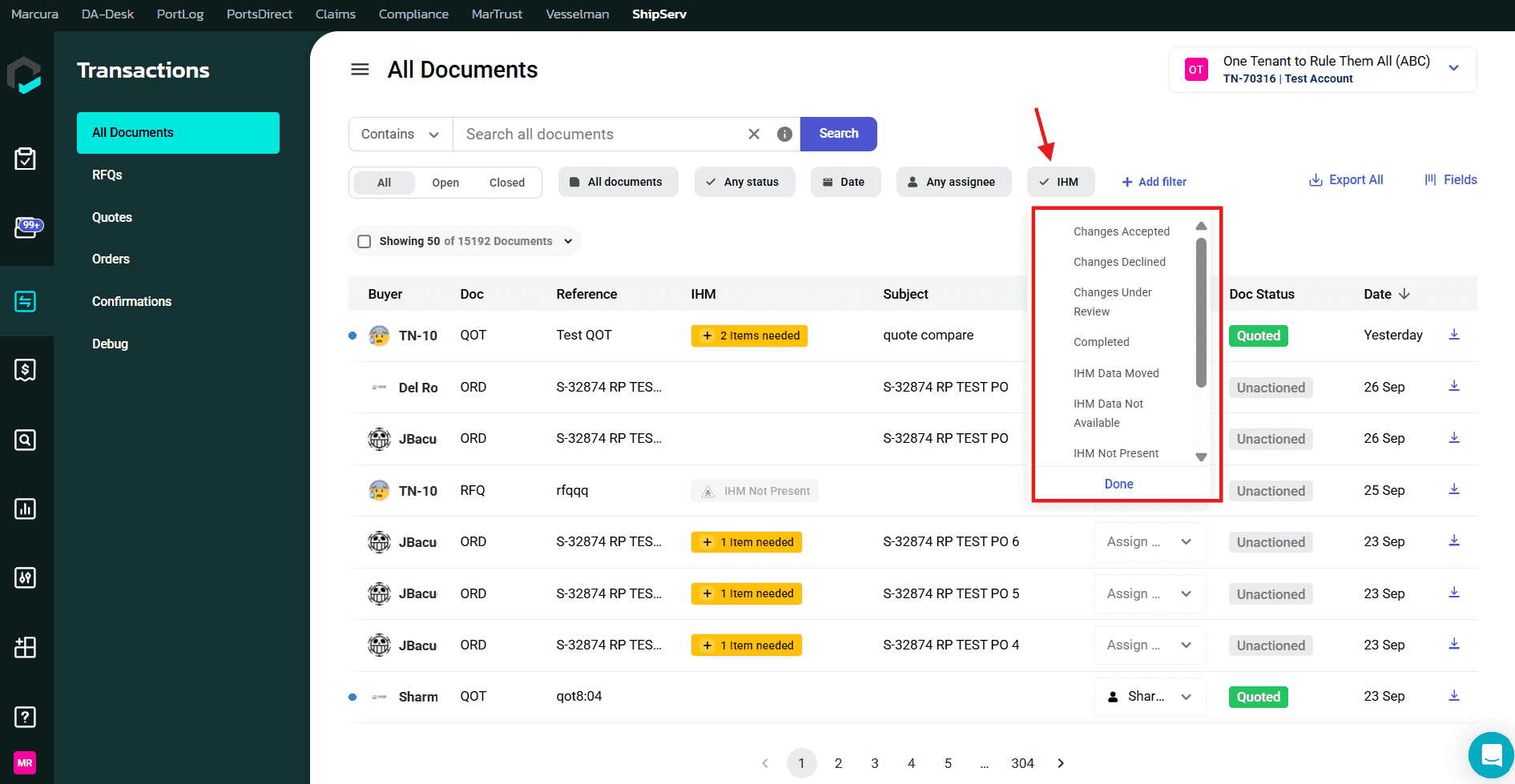
Filter IHM Status in Transaction List View
Quick filtering by compliance status in orders to save time and make compliance status transparent.
Control Tower
IHM List Administration
Centralised admin management of buyer/supplier capabilities to ensure consistent oversight and reduce operational gaps.
Hazard Type Request Approval
Approve or reject supplier reclassification requests to strengthen data integrity and compliance accuracy.
Audit Log
Track all actions across buyers, suppliers, vessels, and ShipServ specialists in the Back Office. Every update, classification change, or document interaction is logged with full detail to provide verified, audit-ready documentation for regulators.


