新闻:Marcura 收购 Brightwell Navigator 船员支付解决方案,以扩大在邮轮行业的影响力

新闻:Marcura 收购 Brightwell Navigator 船员支付解决方案,以扩大在邮轮行业的影响力

A cleaner DA view, built to help you find answers faster

The new DA-Desk UI improves how information is presented in the DA view, giving you clearer visibility and reducing the time spent searching or reaching out to support.

New DA-Desk UI

  • Based on customer feedback, we are improving the DA-Desk UI in phases to make DA information easier to find and understand.

  • The all-new introduces a cleaner, intuitive design that improves visibility and makes your DA view easier to navigate.

Why Use The New UI

  • The updated UI improves how information is presented in the DA view, giving you clearer visibility and reducing the time spent searching or reaching out to support.

  • UI improvements will be rolled out in phases, and updates will be communicated as each phase goes live.

Phase 1 Live

  • Focused improvements across timelines, screening evidence, and DA visibility.

  • Phase 1 delivers immediate visibility where teams need it most:

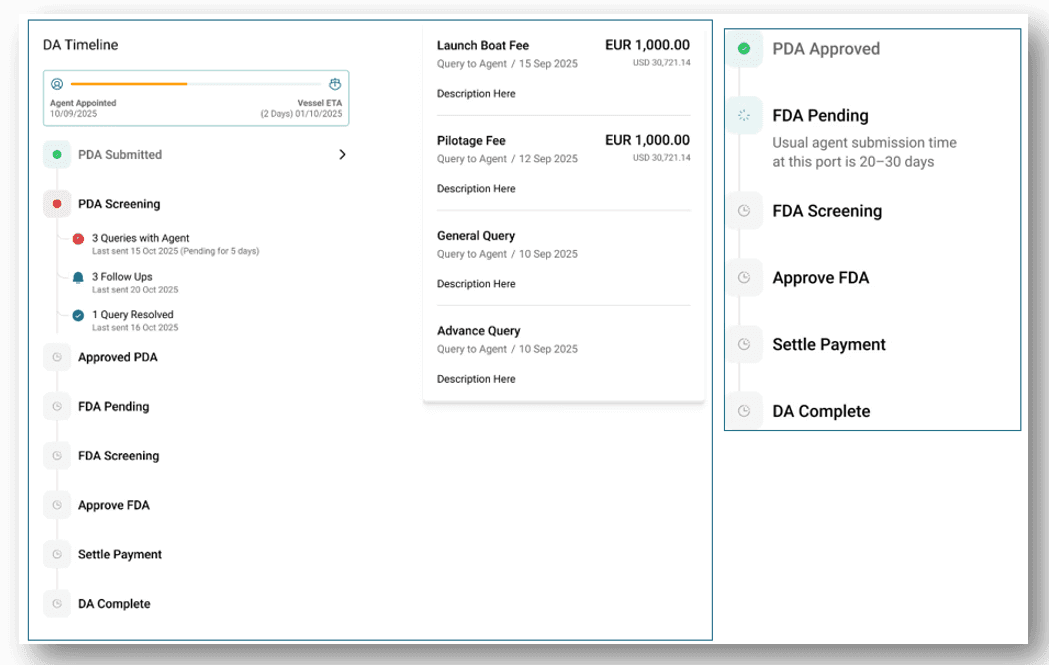
    • DA timeline status and progress

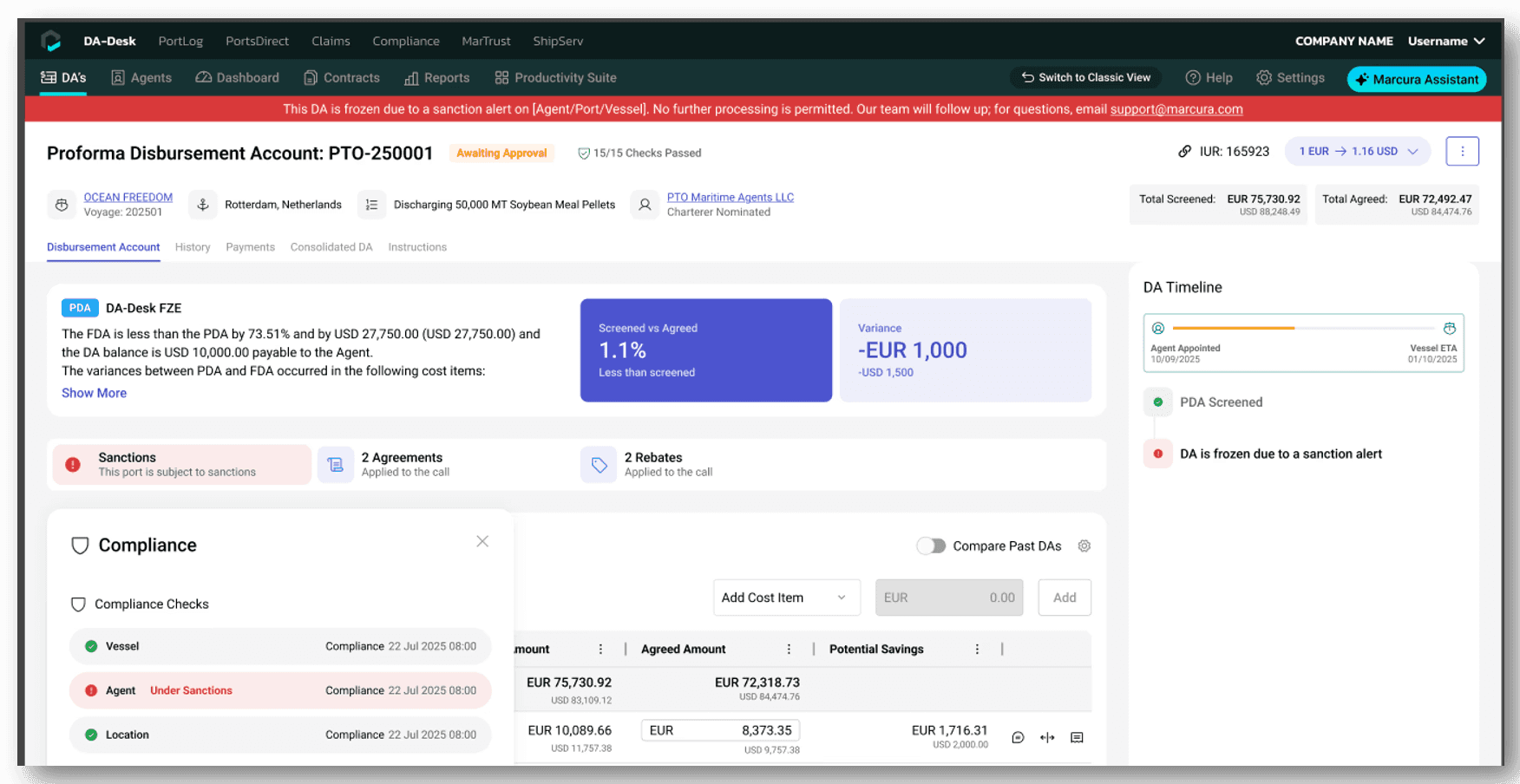
    • Evidence of the screening process applied

    • A clearer list view of DAs, including variance and time bar details

Explore Phase 1 Now

  • Log in to DA-Desk to access the updated UI.

  • Your feedback helps shape the next phases of improvements.

Phase 1 Overview

Gain complete visibility and control over every DA

The DA Timeline brings all PDA, FDA, SDA, invoices, queries, and follow-ups into a single, chronological view.

Operators can instantly see what has happened, what is pending, and what is likely to happen next, eliminating blind spots between PDA approval and FDA submission.

Key enhancements:

  • Displaying follow-up activity (reminders send)

  • Displaying open queries pending resolution

  • Displaying the next approver

  • Prediction of FDA submission

  • Prediction of PDA submission

Approve DAs with confidence

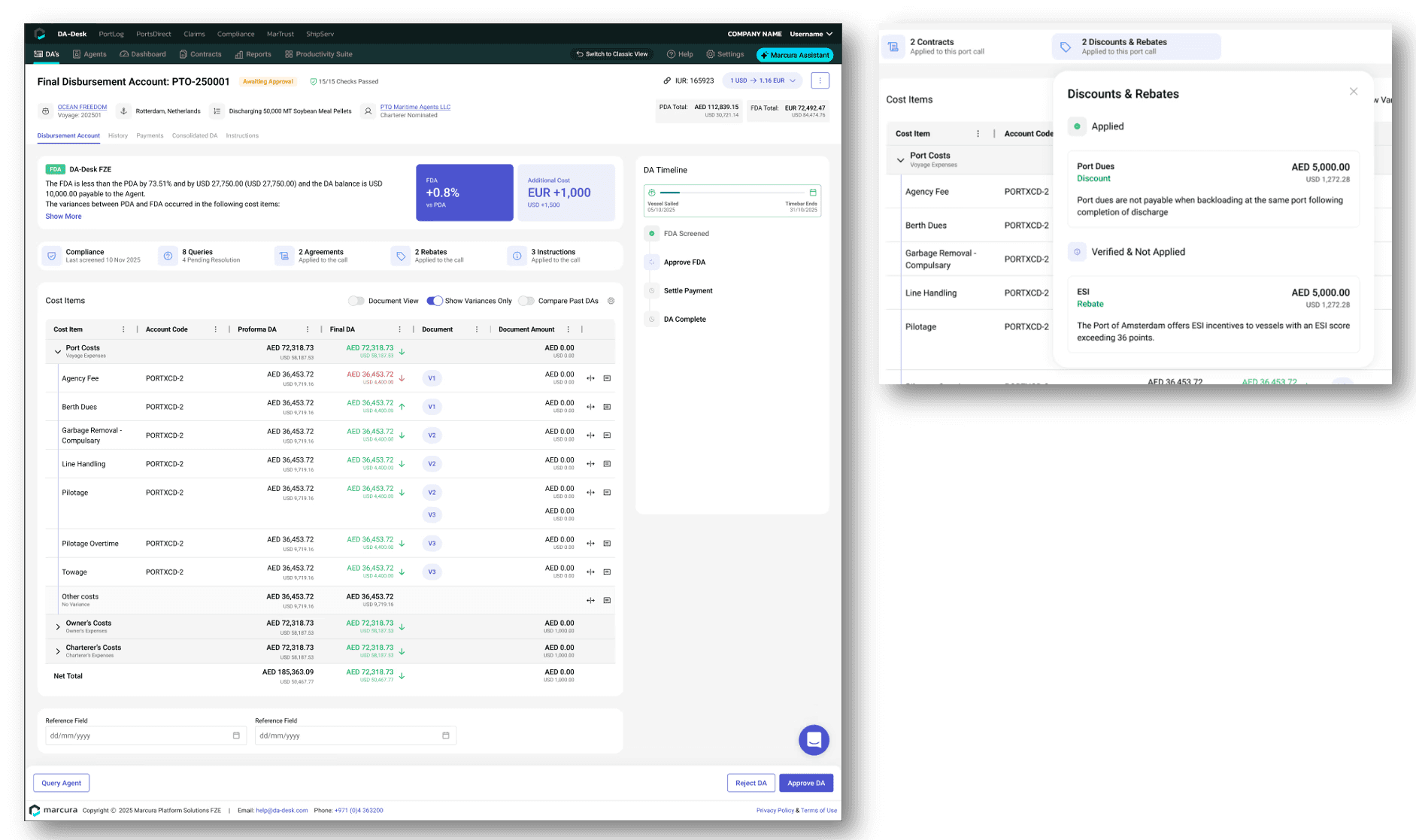
The Evidencing Panel gives operators a single, authoritative view of everything that has already been checked, applied, or intentionally not applied before approving a DA.

Instead of navigating long, fragmented sections or chasing context, decision-makers can immediately see what is compliant, what has been optimised, and where future value exists.

One Place to Validate Before Approval

All screening outputs, agreements, rebates, and instructions are surfaced in one consolidated view, removing guesswork around what has already been handled by DA-Desk.

Clear Proof of Compliance

Sanctions checks across port, vessel, agent, and terminal are clearly evidenced, with visual confirmation when no risks are present. Operators can approve knowing compliance requirements have been met.

Turn the DA list into a live operational control centre

The enhanced DA List gives operators a clear, consolidated view of all Disbursement Accounts, highlighting urgency, risk, and required action upfront.

Instead of working DA by DA or responding to manual status requests, your teams can prioritise the right tasks instantly and move faster with confidence.

Key enhancements:

• Load all DAs
• View aging of days
• Timebar with alerts
• Cost variance with the reason
• Overdue FDA with alerts
• Late PDA with alerts
• Highlight integration errors

We welcome your feedback on the new UI. Your Customer Success Manager is ready to capture your input and support you.

Unlock more value with Marcura

Connect with your Marcura Customer Success Team for more information.

Unlock more value with Marcura

Connect with your Marcura Customer Success Team for more information.

Unlock more value with Marcura

Connect with your Marcura Customer Success Team for more information.

Unlock more value with Marcura

Connect with your Marcura Customer Success Team for more information.

Products

Solutions

Marcura AI

Resources

Careers

Products

Solutions

Marcura AI

Resources

Careers